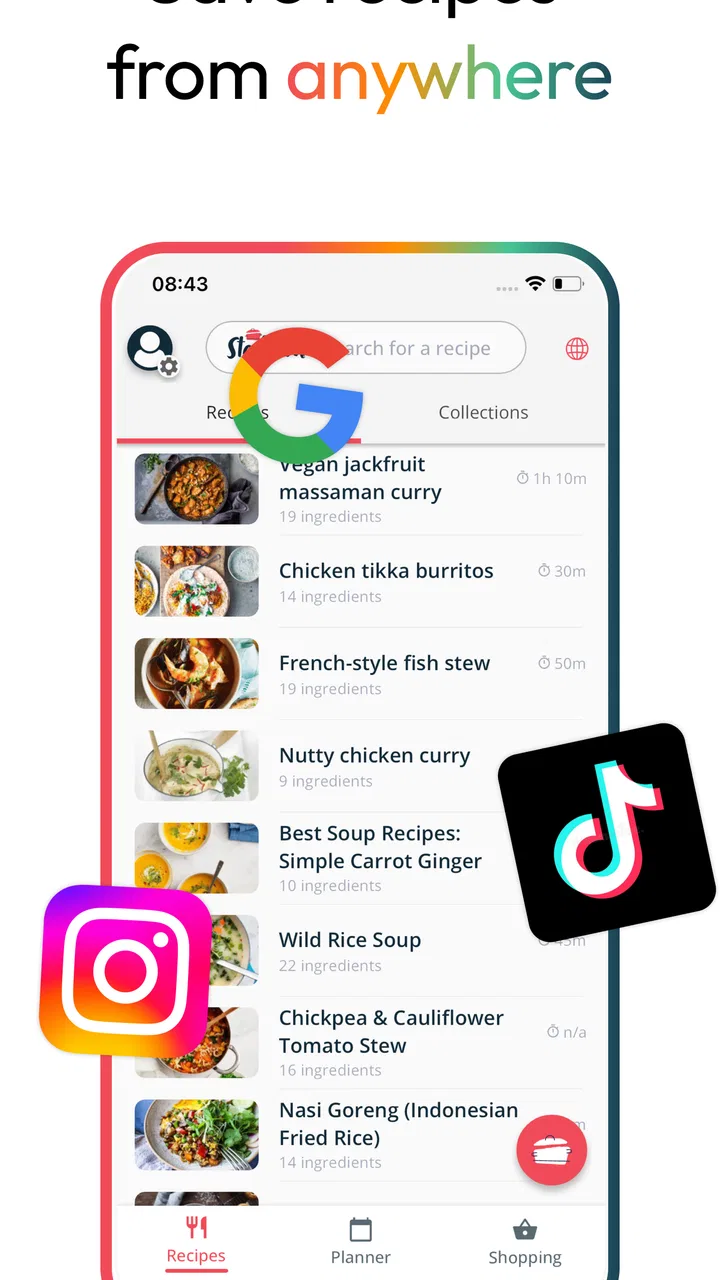
Meal Planner & Recipe Keeper
- 4.5
- Rating
- 500.00K
- Installs
- Free
- Price

 Analysis by App-foxy
I use recipe apps when I want less thinking between getting home and putting food on the table. Meal Planner & Recipe Keeper, developed by Stashcook, is aimed at that exact gap: it brings saved recipes, weekly planning, and shopping preparation into one food-and-drink app. After spending time with it, I found its appeal less about dazzling cooking technology and more about reducing the small bits of friction that make home cooking feel harder than it should.
The app is free to install and suitable for everyone, which makes it easy to try without committing money first. It has built a sizable audience, with over 500 thousand installs and a 4.6 average from around 11 thousand ratings. That reception suggests the basic idea works for many people, but popularity alone does not answer the more useful question: whether it fits the way you actually choose recipes and organize meals.
My short answer is that it is strongest for someone who already finds recipes in different places and wants a calmer way to collect and use them. It is less convincing for a cook who wants a highly structured nutrition program, a social cooking community, or a completely automatic grocery service. The difference comes down to how much control you want to keep over your meals.
You May Also Like

 Blood Strike: 2.5 Anniversary
Blood Strike’s Loadouts Turn Every Drop Into a Tactical Gamble
A close look at Blood Strike’s custom loadouts: how fast access to signature weapons reshapes its battle royale rhythm, rewards preparation, and narrows the gap between fights.

 Pandora - Music & Podcasts
Pandora’s Music Is Easy to Start, but Harder to Recover
Pandora’s strength is its low-effort path from a seed to a station. Its weak spot is how much confidence it asks you to place in connection, setup, and quiet recovery.

 8 Ball Pool
 Is Built on Rivalries, Rematches, and Routine
A close look at the rivalries, rematches, shared routines, and unanswered safety questions that turn a quick pool match into a persistent mobile community.

 Samsung Music
’s Quiet Strength Is Playing What You Already Own
Its reach comes less from spectacle than from dependable access to a personal library. That simplicity is both the app’s strongest retention engine and its ceiling.

 AccuWeather: Weather Radar
AccuWeather Review: A Quick, Clear Forecast for Everyday Decisions
For everyday plans, the best forecast is the one you can understand quickly. AccuWeather makes rain timing, radar, and local conditions easy to act on, with a few trade-offs.

 Hill Climb Racing
Why Hill Climb Racing Still Turns Crashes Into One More Run
A tiny car, a bumpy hill and one more upgrade: Hill Climb Racing keeps resurfacing because its simple chaos makes every near-miss feel personal.
More From Our News Desk
View All News


How the free access and paid value fit together
The most important cost detail is straightforward: the app is free, while optional in-app purchases range from $3.99 to $139.99 per item. That is a very wide range, so I would not treat the app as one single paid product. The sensible approach is to begin with the free experience, build a small recipe collection, and decide whether the way it handles planning saves enough time to justify any optional purchase you encounter.
This matters because meal planning has a low-cost alternative: a notes app, a paper notebook, or a shared list can cover the basics. A paid upgrade only makes sense if it removes repeated work that those simpler tools leave you doing manually. I would judge the value by asking whether I am actually planning several meals, reusing saved recipes, and turning that plan into a practical shopping routine. If I only need one recipe occasionally, paying for extra capacity or convenience would be harder to justify.
The free entry point is still meaningful. It lets a new user test the central workflow rather than judging the app from a screenshot or a short description. I recommend starting with recipes you genuinely cook, not a large collection imported all at once. That makes it easier to see whether the planner helps your real week or merely creates another place to maintain.
Stashcook’s current version is 1.2.244 and it runs on Android 8.0 or later. In practical terms, that makes the app accessible on many older Android devices as well as newer ones. The developer is Stashcook, and the app was released on July 8, 2020, so this is not a brand-new experiment that appeared overnight. Still, the age of the project should not be confused with a promise that every workflow will suit every household; your own habits remain the deciding factor.
What you receive before spending anything
The core proposition is useful because it connects three jobs that are often scattered across separate tools. You can keep recipes together, decide what to cook during the week, and prepare a shopping list from that plan. I found that connection more valuable than any individual part. A recipe collection by itself can become a digital drawer full of good intentions. A planner by itself can feel empty if it does not contain meals you actually want to cook.
There is also a psychological benefit to keeping the plan close to the recipes. When I am tired, I do not want to remember which note contains the ingredient list or search through browser tabs for the version I meant to use. A dedicated recipe keeper gives those decisions a home. The benefit is modest on a single evening, but it becomes noticeable when repeated across a busy week.
That does not mean the app replaces your judgment. It can help organize the meals you choose, but it cannot know whether you have enough time to chop vegetables after work, whether a child will reject a sauce, or whether an ingredient is affordable at your local store. I see it as a planning surface, not an automatic household manager.
A workflow that works best with real recipes
My first useful tip is to treat the recipe collection as a working library rather than an archive. Save meals you are realistically willing to make, then group your week around different levels of effort. For example, pair a more involved dish with a quick meal and a planned leftover night. This prevents the common mistake of creating an ambitious schedule that collapses after the first tiring day.
A second tip is to plan from your shopping reality backward. Before committing to several recipes, look at overlapping ingredients and decide whether you can use them in more than one meal. A leafy herb, a bag of onions, or a packet of tortillas becomes more useful when the week gives it multiple jobs. The app can bring the recipes and shopping needs together, but the savings come from the choices you make while reviewing the plan.
A third, less obvious use is to keep a small group of dependable meals separate in your thinking from recipes you merely want to try. New recipes are enjoyable, but they are poor foundations for a stressful week because preparation time and ingredient availability are uncertain. I would use the app to maintain a reliable rotation, then add experimental dishes around it rather than replacing the whole plan with unfamiliar cooking.
This approach also makes the shopping side more practical. A generated or organized list is only as good as the recipes and quantities behind it. I would still check pantry staples, package sizes, substitutions, and what is already in the refrigerator before leaving home. That final review is not a failure of the app; it is the part that turns a digital plan into a realistic grocery trip.
Where it beats ordinary notes and bookmarks
A notes app is flexible, but flexibility often means you must design the system yourself. You decide how to format recipes, where to put the weekly schedule, and how to convert ingredients into a shopping list. That can work well for a highly organized person, but it puts the maintenance burden on you. This app’s advantage is that it begins with the specific relationship between recipes, meals, and shopping.
Bookmarks have a different weakness. They are good at remembering where a recipe lives, but they do not necessarily help when you are deciding what to cook on Thursday or what ingredients several meals share. A recipe keeper is more useful when the problem is not discovery but follow-through. If you already have dozens of saved recipes and rarely cook them, organization may be more valuable than another source of inspiration.
Compared with a paper notebook, the app is easier to revise when plans change. A rainy day, an unexpected late shift, or a missing ingredient can disrupt a handwritten schedule. Digital planning is better suited to moving meals around without crossing out half the page. On the other hand, paper remains quicker for people who dislike screens in the kitchen or prefer a visible plan on the refrigerator.
The tradeoffs I noticed in everyday use
The first tradeoff is control versus automation. I like being able to make the meal plan reflect my actual preferences, but that also means I must make decisions. Anyone expecting the app to produce a perfect week without input may find it less magical than a specialized subscription meal service. The app helps with the structure; it does not remove the need to choose meals, check ingredients, or adapt to life.
The second is collection size versus usefulness. Saving every appealing recipe feels productive, but a huge library can make planning harder because every choice competes with every other choice. I would periodically remove duplicates, mark dependable favorites mentally, and avoid treating the app as an obligation to cook everything I have saved. The most valuable collection is not the largest one; it is the one I can navigate when I am hungry and short on time.
There is also a practical limitation in relying on a shopping list without reviewing it. Recipes frequently assume that the cook understands ordinary substitutions and pantry ingredients. A list can be technically complete while still being inconvenient for the way you shop. I would organize the final trip by the layout of my usual store and check quantities before buying. That small habit prevents the app from turning planning into unnecessary purchases.
Another tradeoff concerns household coordination. The app can support a personal planning routine, but the value depends on whether everyone involved follows the same plan. In a shared household, one person may choose the meals while another shops, and a list is helpful only if both people trust it and communicate changes. If your family constantly changes dinner at the last minute, a rigid weekly plan may create more annoyance than relief.
A realistic week with the app
Imagine getting home on Monday with enough energy for a proper meal, but knowing the rest of the week will be unpredictable. I would choose one recipe that takes more attention for Monday, a simpler dish for Tuesday, and a meal that can tolerate leftovers later in the week. I would then check the combined ingredients, remove anything already in the pantry, and shop with the revised list rather than blindly buying every item shown.
On Wednesday, if work runs late, I would move the planned meal instead of abandoning the entire schedule. That is where a digital planner earns its place: not by predicting the week perfectly, but by making changes less messy. The plan becomes a flexible queue rather than a set of promises. For me, that is a more realistic use than assigning a fixed recipe to every evening and feeling guilty when circumstances change.
For a couple, the same workflow can reduce repeated conversations about dinner. For a parent, it can help keep familiar meals available while leaving room for one new recipe. For someone living alone, it can highlight when buying a large number of fresh ingredients is unrealistic. The app does not solve food waste by itself, but planning portions and ingredient overlap more deliberately can make waste less likely.
Who will get the most from it
I would recommend it first to people who collect recipes from many sources and have trouble turning that collection into meals. It is also a good fit for cooks who shop without a plan, then discover that the ingredients do not form coherent dinners. The combination of recipe keeping and weekly organization addresses that particular problem better than a generic checklist.
It should also suit anyone trying to make home cooking more consistent without following a strict diet program. You can build a routine around your own tastes, budget, cooking confidence, and available time. That flexibility is valuable for households whose needs change from week to week.
The app is less suitable for someone who wants detailed dietary tracking, medically precise nutrition management, or a service that selects every meal automatically. It is also not my first choice for a cook who already has a smooth system in a notebook or calendar and does not feel the cost of switching. A new tool is only useful when it removes enough friction to repay the attention required to set it up.
Questions worth answering before you commit
Is it genuinely free to try? Yes. The app is listed as free, and optional purchases are available inside it. I would explore the basic workflow before considering anything paid, especially because the purchase range is broad and the right value depends on how heavily you use the planner.
Will it help if I already have recipes saved elsewhere? It can, but the transition takes effort. The benefit begins once your frequently used recipes are in a place where you can plan from them. If you only move a handful of recipes and continue searching elsewhere for every meal, you may not notice much improvement.
Can it handle a changing schedule? It is better suited to flexible planning than to a fixed promise that every meal will happen on a particular day. I would use the week as an adjustable outline, keeping quick alternatives available. That makes the system more forgiving when work, travel, or family plans interfere.
Does it replace grocery judgment? No. It can organize the connection between meals and ingredients, but I would still check what is already at home, compare package sizes, and account for substitutions. That review is especially important if you are trying to control spending or reduce food waste.
Is it appropriate for younger users? The app carries an Everyone content rating, but cooking decisions still depend on age, supervision, and household circumstances. The rating makes the software broadly accessible; it does not turn kitchen tasks into something that requires no adult judgment.
My buy-or-skip verdict
My recommendation is to try the free version if your main problem is scattered recipes or unplanned shopping. The strongest value comes from using it as a repeatable weekly routine: choose realistic meals, check ingredient overlap, review the list, and adjust the schedule when life changes. Used that way, it can save mental effort even when it does not perform every planning decision for you.
I would skip optional spending if you only cook occasionally, already have a reliable system, or are looking for advanced nutrition analysis rather than recipe organization. I would also avoid paying simply because a large recipe collection feels impressive. The purchase is worth considering only after the free experience has become part of your normal week and you can identify a specific inconvenience it would remove.
Overall, I see Meal Planner & Recipe Keeper as a practical organizer for people who want their recipes to lead somewhere: a plan, a shopping trip, and an actual dinner. Its free starting point lowers the risk, while the paid options require a more personal value judgment. The real strength is the connected workflow, not the promise of effortless cooking. If that is the gap in your routine, Stashcook is worth trying; if your needs are more specialized or your current method already works, keeping things simpler may be the better choice.
FAQs for Meal Planner & Recipe Keeper
01What features does Meal Planner & Recipe Keeper offer?
Meal Planner & Recipe Keeper offers a variety of features designed to simplify meal planning and cooking. Users can save their favorite recipes, create customized meal plans, and generate shopping lists based on the ingredients needed. The app also allows for easy sharing of recipes with friends and family, making it a comprehensive tool for both novice and experienced cooks.
02Is Meal Planner & Recipe Keeper user-friendly for beginners?
Yes, Meal Planner & Recipe Keeper is designed with an intuitive user interface, making it accessible for beginners. The app includes step-by-step instructions and clear navigation, which help users easily plan meals and organize recipes. Additionally, the app provides helpful tips and suggestions to enhance the cooking experience.
03Can I sync Meal Planner & Recipe Keeper across multiple devices?
Absolutely! Meal Planner & Recipe Keeper supports synchronization across multiple devices, ensuring that you can access your meal plans and recipes from anywhere. By creating an account, users can seamlessly sync data across smartphones, tablets, and computers, maintaining consistency and convenience throughout their meal planning process.
04What dietary preferences does Meal Planner & Recipe Keeper support?
Meal Planner & Recipe Keeper accommodates various dietary preferences and restrictions, including vegetarian, vegan, gluten-free, and low-carb diets. Users can easily filter recipes and meal plans based on their specific needs, ensuring that they find suitable options that align with their dietary goals and preferences.
05Does Meal Planner & Recipe Keeper offer offline access?
Yes, Meal Planner & Recipe Keeper offers offline access to your saved recipes and meal plans. This feature allows users to continue planning and cooking without an internet connection, making it convenient for those who have limited access to Wi-Fi or prefer to use the app while traveling or in the kitchen.
Pros
- User-friendly interface for easy navigation.
- Extensive database of diverse recipes.
- Customizable meal plans fit dietary needs.
- Syncs across multiple devices seamlessly.
- Offline access for cooking without internet.
Cons
- Limited free features; subscription needed.
- Occasional app crashes reported by users.
- Recipe import feature can be inconsistent.
- Lacks integration with grocery delivery apps.
- Some users find notifications too frequent.

Meal Planner & Recipe Keeper
Gallery